
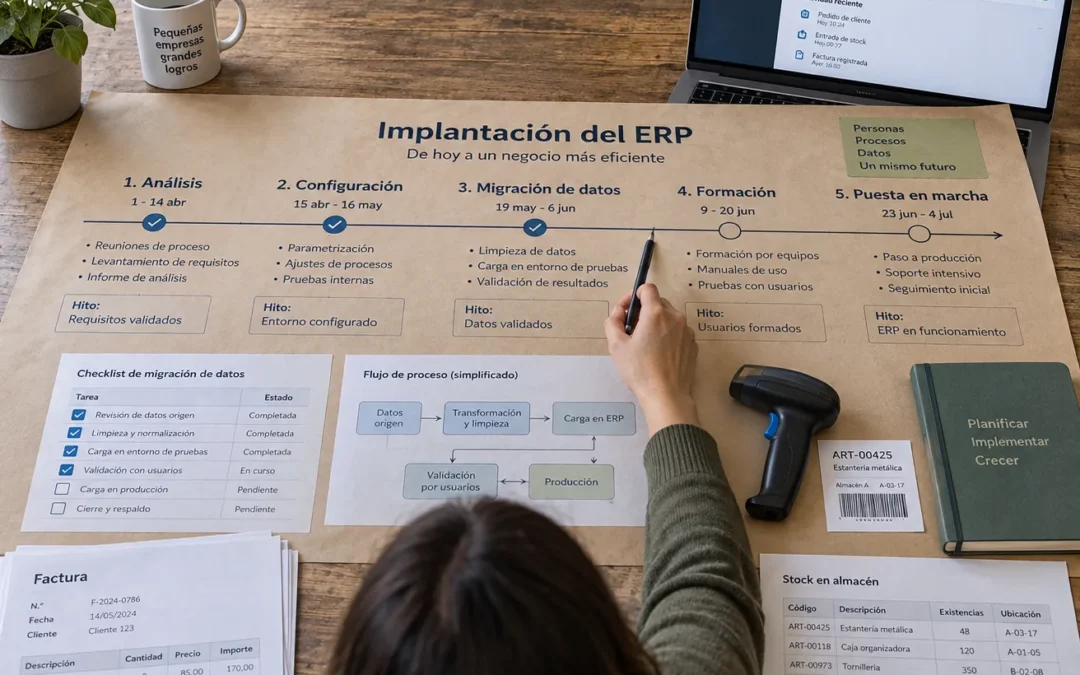
In Spain, the general retention period for books, correspondence, documentation, and business records is six years. When implementing an ERP system in an SME, this requirement affects which data you migrate, which data you keep in a searchable archive, and how you document transactions that occurred prior to the transition.
The project doesn't start by comparing software; it starts by verifying whether your processes and data are ready. Defining the scope, assigning responsibilities, and identifying exceptions before choosing a system helps you avoid paying for customizations that replicate existing problems.
Define your goals, scope, and responsible parties before making a choice
An ERP system connects areas such as sales, purchasing, warehousing, and accounting; therefore, its implementation affects operational decisions, not just the IT department. Before requesting demos, write down the business problem you want to solve and the process that needs improvement.
Turn needs into verifiable results
Set an initial baseline and an expected outcome for each objective. For example, track how long it takes you to close out the month, how many orders require corrections, and what percentage of SKUs have an incorrect unit of measure. Then, agree on what change would demonstrate an improvement, without attributing to the ERP results that also depend on the organization.
Choose a few metrics that you can obtain from your current systems. An SME could measure order fulfillment time, corrected invoices, and the difference between physical inventory and recorded inventory. If you don't have a baseline, you won't be able to determine whether the project has achieved its purpose.
Define what's allowed and who makes the decision
Define the companies, centers, teams, processes, and applications included in the first phase. Also clarify what is excluded: incorporating subsidiaries, changing e-commerce, and redesigning project management all at once can cause the scope to expand without a clear point of responsibility.
Appoint a business owner and a process owner for each affected process. These individuals set priorities, resolve conflicts, and validate results; the vendor configures the system but cannot decide on behalf of the company which business rules to apply. Document the decisions and the reasons behind them.
Account for internal resources in addition to licenses, hosting, and implementation services. Key users need time to analyze processes, prepare data, and test scenarios; if they continue to handle their usual workload without dedicated time, the project will be delayed or validated only superficially. That operational cost must be included in the plan.
Redesign the processes before implementing them in the system
An ERP system organizes the flow of information, but it also highlights inconsistencies between departments. It maps out current workflows—from order placement to collection and from purchase requests to payment—and documents exceptions that affect accounting, logistics, or tax treatment.
Distinguish between business rules and customs
For each process, ask which control safeguards a requirement or prevents an error, and which step exists solely because an older tool did not allow it to be done any other way. Retain the necessary controls and eliminate redundancies; duplicating every previous screen and approval step tends to make implementation more expensive.
An additional approval step does not always improve control. If all purchases require three signatures, identify which amount or category triggers each authorization and who makes the final decision. Then, establish explicit rules and create a documented process for urgent exceptions, rather than making email shortcuts the norm.
Handle exceptions judiciously
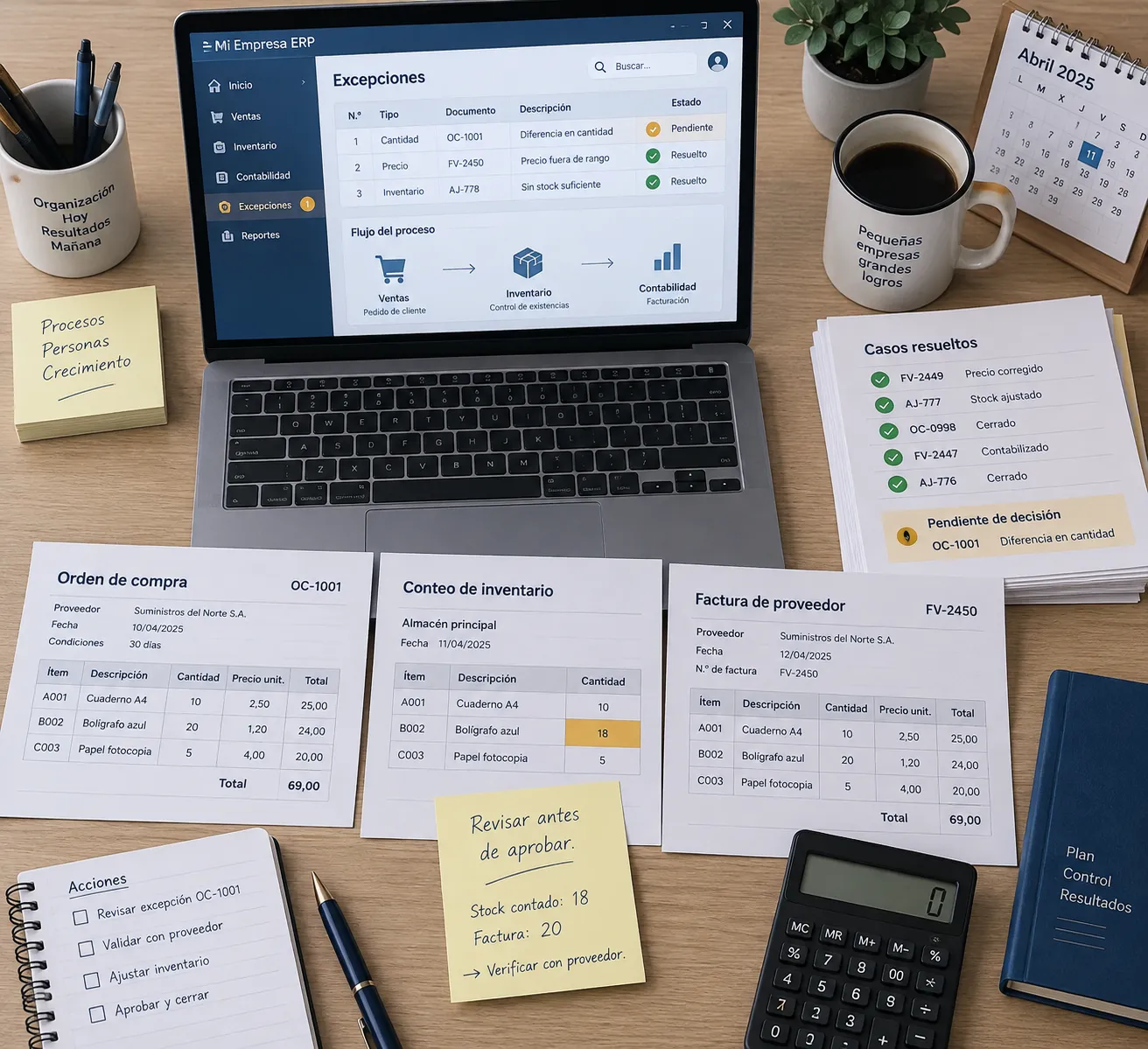
Classify exceptions by frequency, risk, and the cost of managing them. An occasional sale involving a special unit of measure may require an operational procedure; a recurring tax issue requires a solution validated by the accounting team. Don't turn every exception into an ERP customization.
Work with users from sales, warehousing, and administration to define what the standard process should entail and which situations fall outside its scope. A simple map of inputs, responsible parties, approvals, and outcomes is sufficient for identifying manual transfers; complex diagrams are no substitute for a decision regarding who enters each piece of data.
Conclude this phase by identifying approved and pending processes, not with an indefinite wish list. If a key rule remains unassigned, or if each department describes a different workflow, postpone the selection: a business demonstration will not resolve that organizational disagreement.
Select an ERP system based on functional fit and operating costs
Compare systems once you know your priority processes and the scope of the first phase. Evaluate each option using the same use cases: placing an order, processing a return, receiving merchandise, and posting an invoice. This will help you distinguish between a feature that’s already available and one that requires further development.
Compare requirements, not feature lists

Distinguish between mandatory, desirable, and non-essential requirements. Mandatory requirements may include managing multiple companies, batch traceability, integration with your online store, or generating the tax information required by your operations. Validate these points in a guided test using your own data and scenarios.
| Alternative | Operations Handled by Your Company | When does it work best? |
|---|---|---|
| ERP as a Cloud Service | Manage users, data, settings, and contracts; the provider operates the platform according to the contracted service | If you prioritize reducing infrastructure tasks and accept the service's limitations |
| Configurable ERP with managed hosting | Specify who is responsible for maintaining the server, the application, updates, and backups, as outlined in the contract | If you need flexibility and a technical lead for the environment |
| ERP on In-House Servers | Handles infrastructure, patches, monitoring, backups, and service continuity | If you have in-house capabilities and specific control requirements |
Check who maintains each layer
Hosting and ERP are not the same thing. Make sure to document in writing who is responsible for the database, updates, extensions, backups, disaster recovery, and incident support. For a managed service, also confirm what the contract covers and which tasks remain your company’s responsibility.
Calculate the total cost, including licenses, consulting, migration, integrations, maintenance, training, and team time. With a solution like Odoo, compare your requirements with standard features before budgeting for custom modules; a specific customization can increase the amount of work required for subsequent updates and testing. Customization has a lifecycle cost, even if the initial budget doesn't show it.
Clean up the data and plan the migration using clear rules
Migrating does not mean copying all the tables from the old system. Decide which data is necessary for your work, which data you must retain for legal or reference purposes, and which data should be discarded. The business team must approve these rules before transforming the data.
Article 30 of the Commercial Code establishes a general retention period of six years for business books, correspondence, documentation, and supporting documents, beginning with the last entry made.
Decide what to migrate, archive, or leave behind

Migrate the current master data and the balances needed to get started: customers, vendors, products, accounts, and open documents. The complete historical data should only be transferred to the new ERP system if there is an operational need and if it can be converted and validated reliably. For historical inquiries, a read-only file may be more appropriate.
| Type of information | Standard decision | Pre-change Check |
|---|---|---|
| Active Customers and Suppliers | Migrate | Tax ID, Address, and Duplicates |
| Current Products and Rates | Migrate | References, Units, Taxes, and Prices |
| Pending Orders and Invoices | Migrate | Associated amounts, statuses, and balances |
| Past Closed Transactions | Archive or Migrate with Justification | Access, Preservation, and Traceability |
Clean up with controls, not with improvised changes
Detect duplicates, empty required fields, repeated codes, incompatible units, and obsolete records. Do not fill in tax data based on assumptions or merge customer records based solely on similar names; agree on standardization rules and keep a record of rejected or corrected records.
Perform a test migration in a separate environment and reconcile the results with the source system. Verify record counts, account balances, inventory by location, and pending documents. A correct overall total does not rule out errors by customer, product, account, or period, so also validate samples by category.
Set a cutoff date and decide which transactions will be entered into each system during the transition. Without this rule, you’ll end up with duplicate sales, unrecorded inventory movements, and invoices posted twice. Restrict access to the historical archive and limit the personal data you need to retain.
Configure, integrate, and test before going live
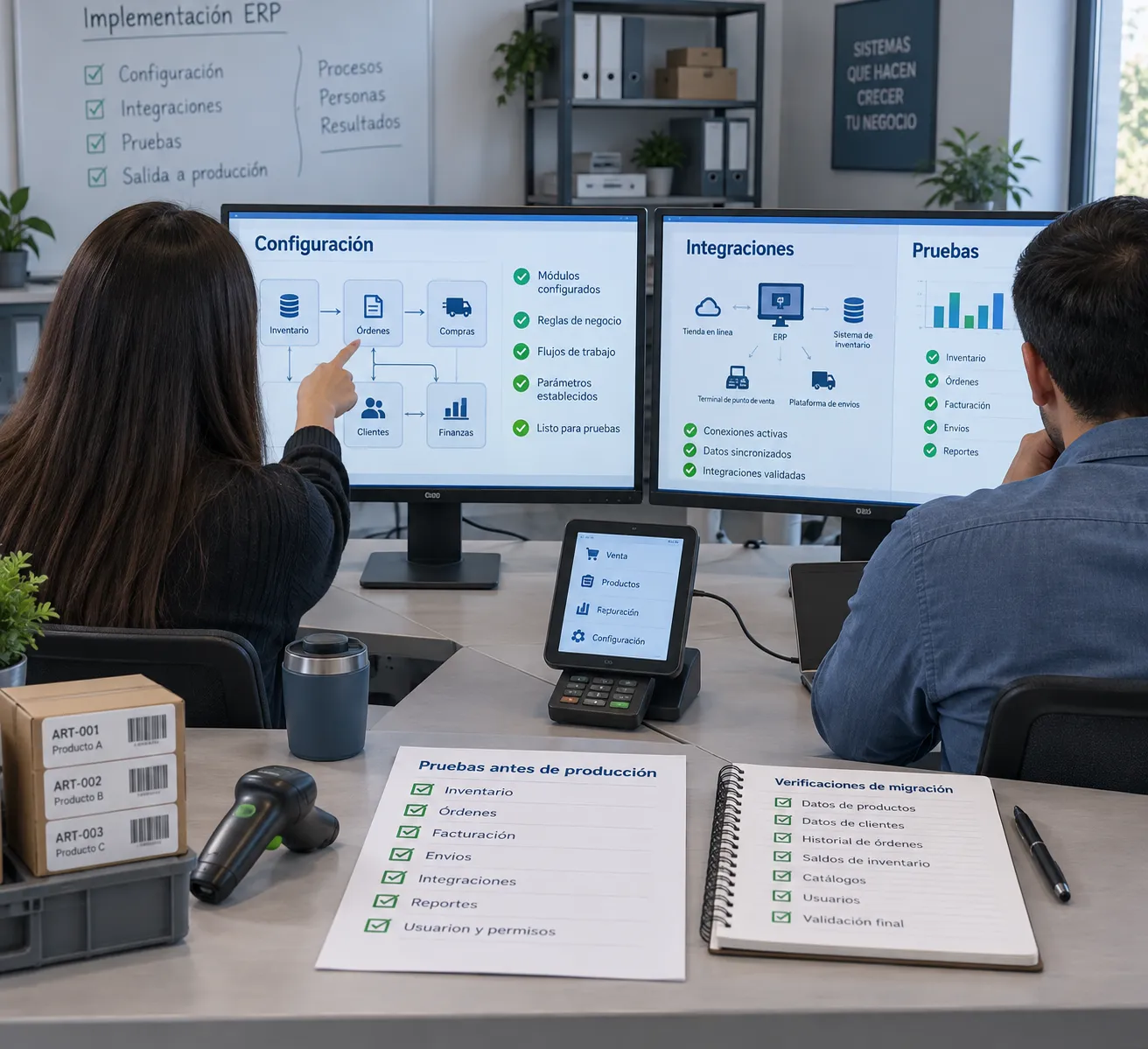
First, configure the approved processes using standard functions. Customizations must address a specific requirement, have a designated person in charge, and pass a maintenance review; if they are merely compensating for a poorly defined process, resolve that issue before writing code.
Install only the necessary apps
I would take inventory of every connection to external accounting systems, e-commerce platforms, banks, logistics providers, POS systems, or customer service tools. For each integration, specify which system owns the data, when it is updated, and how errors are detected. A file-based import and an API connection have different monitoring and recovery requirements.
For API integrations, validate authentication, permissions, usage limits, error logs, and retries. Avoid exchanges that update the same field in both systems without a priority rule. A silent failure in pricing or inventory can propagate to orders before the team detects it.
Test with real users and real-world scenarios

Have representative users test complete transactions, not just isolated screens. Include returns, cancellations, discounts, partial orders, applicable taxes, and accounting closings; also test permissions to confirm that each user profile sees and modifies only what it needs to.
Record each issue, including the steps to reproduce it, its severity, the person responsible, and the expected outcome. Distinguish between errors that block progress and those that can wait. Do not authorize the release if there are any errors that affect amounts, inventory, permits, or tax documents. Repeat the tests after correcting them, and keep the validation records.
Also test performance using representative data volumes and verify the backup restoration plan. Test a restore, not just the creation of files: a backup that cannot be restored will not allow you to resume operations. Agree on how to revert to the previous system if a critical condition fails during startup.
Train users and prepare for daily operations
Training begins during the analysis phase, when users help define how each task should work. If they participate only at the end, they will be too late to notice any omitted rules and will end up with a system they do not recognize as their own.
Teach by Functions and Tasks
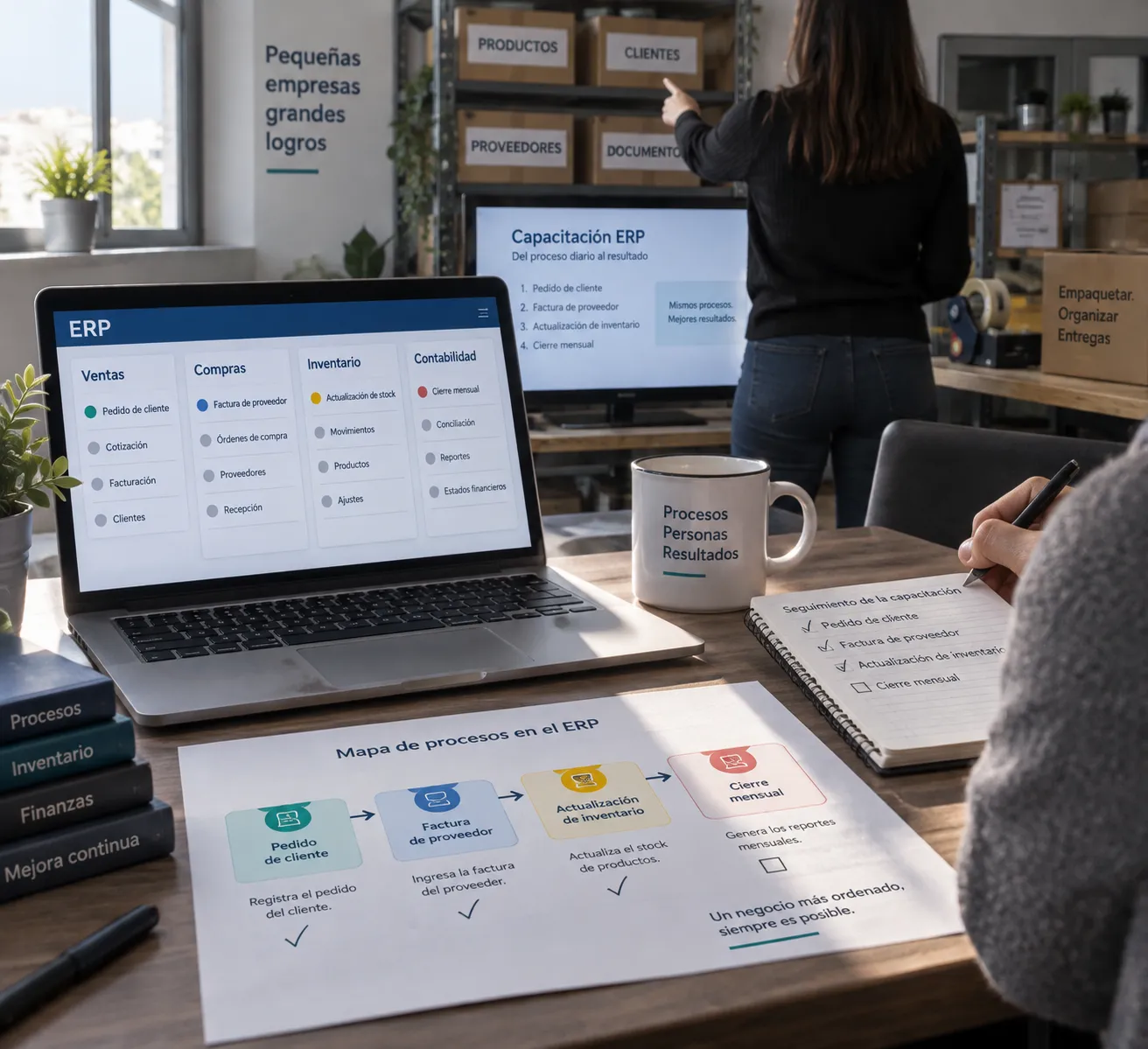
Design training sessions by role: administration, purchasing, sales, and warehouse staff need to practice different operations. Use a test environment with sample data and brief guides for common tasks, such as issuing an invoice or recording a receipt; do not use real personal information in training materials.
Identify key users in each area to resolve first-level inquiries and report issues with context. Measure readiness through observable tasks, not just attendance: each user must be able to complete their routine tasks and know what to do if data is missing or an error occurs.
Ensures support, backups, and technical responsibilities
Define support hours, the incident reporting channel, priorities, and contractual response times. Specify who is authorized to correct data, install extensions, and deploy changes. If the ERP uses a Linux infrastructure with Docker, document images, persistent volumes, environment variables, and the update procedure; an undocumented configuration complicates any recovery effort.
Schedule backups of the database and associated files, encrypt the stored data, and keep at least one copy separate from the main server. Determine the frequency based on the volume of transactions you can afford to lose, and test restores periodically. Also review permissions, security updates, monitoring, and alerts.
Choose the go-live date based on system downtime, inventory, and equipment availability—not just the vendor’s schedule. During the first few days, assign personnel to handle issues and review orders, invoices, inventory, and integrations at an agreed-upon frequency. Keep the previous system available in accordance with the cutoff plan and retention requirements.
Frequently Asked Questions
How long does it take to implement an ERP system in an SME?
There is no single timeline: it depends on the number of processes, data quality, integrations, and customizations. Ask for a timeline that includes decision milestones, test migration, user acceptance, and go-live—not just a single date.
Do we need to migrate all historical data to the new ERP system?
No. Migrate the current data and the data needed for operations; keep the rest in a searchable archive if you are required to retain it or to respond to inquiries. Before decommissioning the old system, verify that you can locate documents by client, date, and reference number.
Is it a good idea to switch ERP systems at the end of the fiscal year?
Not necessarily. Avoid scheduling it during accounting closings, inventory counts, or sales peaks, and choose a time that allows you to reconcile balances and train the team. If the cutoff date does not coincide with the calendar year, document how the opening balances are carried forward.
Does Odoo need its own server?
No. Odoo can run on a cloud service or in an environment hosted by a provider, depending on the edition, architecture, and requirements. Before signing a contract, confirm who is responsible for updates, backups, security, recovery, and support for the application—not just the server.
Six years is the general statutory retention period for corporate books, correspondence, documentation, and business records under Spanish commercial law. When implementing an ERP system in an SME, this requirement directly determines what data to migrate, which records to preserve in a searchable, read-only archive, and how to audit the opening balances of the new system.
Implementing an ERP system in an SME is successful when it is treated as an organizational workflow project rather than a routine software installation. Each phase proceeds with fewer bottlenecks if you establish measurable goals, streamline operational processes before configuring screens, and clearly separate the live data required for day-to-day operations from information retained solely for legal compliance.
Define Objectives, Scope, and Key Contacts Before Choosing a System
An ERP system connects core business functions such as sales, procurement, inventory, and accounting. Consequently, its implementation affects operational decision-making—not just the IT team. Before scheduling software demonstrations, document the specific business challenges you want to address and the measurable operational workflows that need to improve.
Translate Business Needs into Verifiable KPIs
Establish a baseline metric and an expected target for each goal. For example, track how many days your team takes to complete monthly accounting closings, how many orders require manual corrections, or what percentage of product listings have incorrect units of measurement. Then, define what tangible change indicates success, taking care not to attribute outcomes to the ERP system that are fundamentally dependent on organizational discipline.
Select a concise set of metrics that can be extracted from your current systems. An SME might track order dispatch preparation time, credit note ratios, and discrepancies between physical inventory and warehouse records. Without an objective baseline, it is impossible to verify whether the project delivered a real ROI.
Set Strict Scope Boundaries and Designate Decision-Makers
Determine which business entities, branch offices, teams, workflows, and third-party tools are included in the initial launch phase. Clarify what remains out of scope: onboarding overseas subsidiaries, overhauling your e-commerce storefront, and redesigning project management all at once will lead to scope creep without clear accountability.
Appoint a business project manager and a process owner for each affected department. These leaders prioritize requirements, resolve workflow conflicts, and validate acceptance criteria. While the implementation partner configures the software, they cannot dictate your company’s commercial and operational policies. Systematically document decisions and their rationale.
Budget for internal staff capacity, along with licensing, hosting, and consulting costs. Key users need dedicated time to analyze processes, sanitize data, and run test scenarios; if they are required to handle their full daily workloads without reserved project hours, milestones will be missed and testing will become superficial. This internal labor cost must be reflected in the budget.
Streamline Business Workflows Before Migrating Them to the System
An ERP system streamlines the flow of information, but it also reveals departmental silos and operational inconsistencies. Map out existing end-to-end workflows—from order to cash and from purchase requisition to invoice payment—and document any special exceptions that affect accounting, logistics, or tax treatments.
Distinguish Core Business Rules from Legacy Habits
For each procedure, ask which checkpoints ensure compliance with legal requirements or prevent errors, and which steps exist solely because outdated tools necessitated workarounds. Retain essential governance controls while eliminating redundancies; replicating every legacy screen, manual approval, and spreadsheet stamp unnecessarily inflates custom development costs.
Additional approval layers do not necessarily improve governance. If every purchase order requires three signatures, define threshold levels and assign accountability roles. Establish explicit validation rules with a documented bypass procedure for emergency situations, rather than allowing uncontrolled email shortcuts to become the norm.
Resolve Operational Exceptions Using Clear Criteria
Categorize exceptions by frequency, financial risk, and administrative overhead. An occasional sale requiring an irregular unit of measurement can be handled according to standard operating guidelines; a recurring fiscal requirement calls for a validated accounting rule. Don't turn every minor exception into expensive custom software code.
Collaborate with sales, warehouse, and administrative leaders to determine the scope of standard workflows versus outlier cases. A clear overview of inputs, owners, authorizations, and outputs is sufficient to identify manual handoffs; elaborate BPMN diagrams cannot replace clear accountability for data entry.
Conclude this preparatory phase with approved workflows and documented open questions, not an open-ended wish list. If a critical business rule lacks an owner or departments disagree on the direction of the workflow, pause the system selection process: a vendor demo will not resolve internal organizational friction.
Choose Your ERP Based on Functional Fit and Actual Operating Costs
Compare software solutions only after the core workflows and Phase One scope boundaries have been finalized. Evaluate each candidate using identical, realistic test cases: placing an order, processing a return, receiving goods into inventory, and reconciling a supplier invoice. This exercise distinguishes built-in capabilities from sales promises that require custom engineering.
Benchmark Concrete Requirements, Not Generic Feature Lists
Segment requirements into mandatory, desirable, and deferrable tiers. Mandatory criteria may include multi-company financial management, batch and serial traceability, real-time online store synchronization, or automated e-invoicing compliance (e.g., Verifactu/TicketBAI). Validate these items during hands-on guided demos using your own sample data.
| Deployment Model | Internal Operational Scope | Best-Fit Scenario |
|---|---|---|
| Multi-tenant SaaS Cloud ERP | Manages users, data, settings, and contracts; the vendor operates the hosting and infrastructure infrastructure | Prioritize minimizing sysadmin overhead while adhering to strict functional boundaries |
| Customizable ERP with Managed Cloud Hosting | Define server management, application maintenance, updates, and backup schedules under the SLA | The Need for Functional Agility with an Outsourced Technical Infrastructure Partner |
| On-Premise / Bare-Metal Dedicated Server ERP | Handles all hardware and container infrastructure, security patching, monitoring, and backups | Internal sysadmin capacity and strict governance or high-concurrency requirements |
Verify Who Maintains Each Infrastructure Layer
Hosting and ERP application management are separate responsibilities. Confirm in writing who is responsible for database indexing, kernel upgrades, module compatibility, backup encryption, disaster recovery testing, and incident SLAs. In a managed solution, understand what is included versus what requires action by your internal team.
Calculate the total cost of ownership (TCO), including licenses, consulting, data extraction, API integrations, maintenance, training, and team hours. In modular platforms like Odoo, benchmark business needs against out-of-the-box community or enterprise features before requesting custom code; custom modifications increase long-term testing and migration challenges. Custom code incurs recurring lifecycle costs rarely visible in initial quotes.
Clean Data and Plan the Migration Using Explicit Rules
Data migration is not simply a blind database dump from legacy software. Determine which data is required for live operations, which must be retained for regulatory and tax purposes, and which should be purged. Business stakeholders must approve these normalization rules before data engineering begins.
Article 30 of the Spanish Commercial Code establishes a general statutory retention period of six years for corporate books, correspondence, documentation, and receipts, beginning on the date of the last journal entry.
Define What to Migrate, Archive, or Deprecate
Migrate active master data and opening balances required to start operations: active customers, suppliers, product catalogs, charts of accounts, and open documents. Full historical transaction ledgers should only be transferred if there is a day-to-day operational need and the data can be reconciled with audit integrity. For historical queries, a secure, read-only archive is often cleaner, safer, and faster.
| Data Category | Recommended Decision | Pre-Migration Audit Check |
|---|---|---|
| Active Customers & Suppliers | Migrate | Tax IDs (NIF/CIF), billing addresses, and deduplication |
| Current Products & Price Lists | Migrate | SKUs, units of measure, tax categories, and margins |
| Open Orders & Unpaid Invoices | Migrate | Net totals, document status, and ledger balances |
| Closed Historical Transactions | Archive (or migrate, with justification) | Audit lookup, statutory retention, and data lineage |
Enforce Quality Controls, Not Ad-Hoc Edits
Detect duplicate records, missing required fields, duplicate barcodes, conflicting units of measure, and obsolete catalogs. Never guess fiscal identifiers or merge accounts based on loose name matching; document explicit normalization algorithms and maintain an audit log of rejected or modified records.
Run trial mock migrations in an isolated staging environment and reconcile line items against legacy systems. Compare total row counts, ledger balances, warehouse inventory by location, and outstanding accounts receivable. Aggregate totals can mask errors at the customer level, so audit representative, stratified samples across each category.
Establish a strict cut-over window and set transaction rules for the transition weekend. Without strict cut-off protocols, duplicate invoices, missing inventory transfers, and reconciliation failures will occur. Maintain restricted access to legacy systems and ensure GDPR compliance regarding retained personal records.
Configure, Integrate, and Test Extensively Before Going Live
Configure approved workflows using native system capabilities first. Custom developments must address a verified business requirement, have an assigned sponsor, and pass a long-term maintenance review; if custom code merely patches an ambiguous procedure, fix the process before writing code.
Integrate Only Essential External Services
Map every connection to external accountants, e-commerce platforms, banking APIs, warehouse logistics systems, POS terminals, or CRM suites. For each interface, document data ownership, synchronization frequency, and error-handling procedures. Batch CSV transfers and real-time REST APIs have different monitoring and recovery requirements.
For API integrations, validate authentication lifecycles, rate limits, retry backoff strategies, and dead-letter queues. Avoid bidirectional sync loops that update identical fields in both systems without a designated master. A silent glitch in price or inventory updates can propagate to customer orders before the team notices.
Conduct User Acceptance Testing Using Realistic Scenarios
Ensure that key end-users test full business cycles end-to-end, rather than isolated forms. Include customer credit returns, order cancellations, volume discounts, partial warehouse receipts, tax exceptions, and financial closings. Audit role permissions to confirm that users can view and edit only what their job duties require.
Log all issues, including reproducible steps, severity ratings, assigned owners, and expected behavior. Distinguish between blocking bugs and cosmetic improvements that can wait until Phase 2. Never authorize a go-live if open bugs affect currency amounts, inventory levels, security permissions, or fiscal invoices. Retest after applying the patch and archive the signed validation evidence.
Stress-test database performance under realistic concurrency conditions and test the disaster recovery plan. Test a full restore, not just backup creation: a backup that cannot be restored will not save your operations. Document fallback protocols to resume business operations if an emergency rollback is triggered during go-live.
Train End Users and Ensure Daily Operational Readiness
Training begins during the initial workflow discovery phase, when end users help determine how day-to-day operations should proceed. Involving users only in the final week ensures that missing business rules will be discovered too late and that users will resist using an unfamiliar tool.
Structure Training by Job Roles and Practical Scenarios
Organize sessions by operational department: accounting, purchasing, sales, and warehouse logistics each require specific hands-on exercises. Use an isolated sandbox populated with realistic sample data and concise standard operating procedures (SOPs), such as generating a credit note or processing a bill of lading. Avoid using live customer data in training environments.
Designate departmental power users to handle Tier 1 questions and log technical tickets with relevant context. Assess operational readiness through observable tasks rather than passive course attendance: each user must independently complete routine tasks and understand what to do when validation errors occur.
Secure Support Agreements, Backup Protocols, and Technical Ownership
Define support hours, escalation channels, severity tiers, and contractual SLA response windows. Specify who is authorized to modify master records, deploy add-ons, or modify database schemas. If your ERP runs on a Linux Docker stack, document container images, persistent volumes, environment variables, and update procedures; undocumented configurations can cripple recovery efforts.
Automate database and filestore snapshots, encrypt them in transit and at rest, and maintain at least one immutable offsite copy separate from the production host. Adjust the backup frequency to match your acceptable data loss tolerance (RPO) and conduct quarterly restoration drills. Review server firewalls, security patches, 24/7 monitoring, and alert triggers.
Schedule the go-live date around fiscal year-ends, inventory audits, and team availability, rather than the vendor's billing calendar. During the first two weeks after launch, assign dedicated support engineers to review sales orders, invoices, stock movements, and API integrations on a daily basis. Maintain access to the legacy system in accordance with statutory retention guidelines.
Frequently Asked Questions (FAQ)
How long does an ERP implementation take in an SME?
There is no single timeline: it depends on the scope of the business, data quality, API complexity, and custom development requirements. Request a project roadmap structured around milestone gates, mock migration audits, user acceptance sign-offs, and cutover windows, rather than an isolated, arbitrary date.
Do we have to migrate our entire transaction history to the new ERP?
No. Migrate active master catalogs and opening balances required for live trading; preserve historical ledgers in a secure, searchable, read-only archive to meet legal obligations. Before decommissioning legacy software, verify that documents can be searched by client, date, and reference.
Should an ERP go-live coincide with the fiscal year-end?
Not necessarily. Avoid overlapping with stressful year-end accounting closings, annual physical inventory counts, or seasonal sales peaks. Choose a time that allows for a smooth account reconciliation and focused staff training. If launching mid-year, thoroughly document the rules for opening balance cutovers.
Does Odoo require a dedicated server?
No. Odoo can run on multi-tenant cloud SaaS or on managed dedicated bare-metal infrastructure, depending on your functional requirements and concurrency. Before making a decision, confirm who manages updates, backups, security patching, disaster recovery, and software support for each tier.
Six years is the general legal retention period for business records, correspondence, documentation, and supporting documents, according to the Spanish Commercial Code. When implementing an ERP system in an SME, this requirement directly influences which data is migrated, which data is retained in a reference file, and how the opening balances in the new system are verified.
Implementing an ERP system in an SME is successful when it is approached as a work organization project rather than simply as a software installation. The phases proceed smoothly if measurable goals are set, processes are streamlined before configuring screens, and operational data is separated from data retained solely for tax compliance purposes.
Define Objectives, Scope, and Responsible Parties Before Making a Selection
An ERP system connects strategic areas such as sales, purchasing, inventory, and accounting; therefore, its implementation affects operational and business decisions, not just the IT department. Before requesting demos, write down which business problem you want to solve and which key process needs to be improved.
Turn Needs into Verifiable Results
Define a starting point and an expected outcome for each milestone. For example, track how long it takes to close the accounting month, how many orders require manual adjustments, and what percentage of SKUs have an incorrect unit of measure. Next, agree on what kind of change would demonstrate a real improvement, without attributing results to the ERP that depend primarily on internal organizational factors.
Choose a few key performance indicators (KPIs) that you can extract from your current systems. A small business can measure order fulfillment time, corrected invoices, and the discrepancy between physical inventory and recorded inventory. If you don't have a baseline, you won't be able to assess whether the project has achieved its goal.
Define the Scope and Establish Who Makes the Decisions
Define the companies, divisions, teams, processes, and applications that will be part of the first phase. Also clarify what is excluded: incorporating subsidiaries, changing the online store, and managing projects all at once can cause the scope to spiral out of control without clear leadership.
Designate a person responsible for business operations and an owner for each affected process. These individuals set priorities, resolve operational conflicts, and approve acceptance; the provider configures the system but cannot decide on your company’s behalf which business policies to apply. Document decisions and the reasons behind them in writing.
Calculate internal resources in addition to licenses, hosting, and implementation consulting. Key users need dedicated time to analyze processes, clean data, and test scenarios; if they have to handle their usual workload without dedicated time, the project will be delayed or validated only superficially. This team cost must be included in the plan.
Redesign the Processes Before Migrating Them to the System
An ERP system structures the flow of information, but it also highlights inconsistencies between departments. Map out the actual workflow from order placement to collection and from purchase requisition to payment; document any exceptions that affect accounting, logistics, or tax processing.
Distinguish Between the Rule of Business and Customary Inheritance
For each process, ask which control fulfills a legal requirement or prevents a serious error, and which step exists solely because an outdated tool did not allow for a different approach. Retain the necessary controls and eliminate redundancies; replicating every previous screen and signature only makes implementation more expensive.
An additional approval step does not always improve control. If all purchases require three signatures, specify—by amount or category—who assumes responsibility. Then, establish explicit rules and maintain a documented process for emergencies, rather than relying on ad hoc email instructions.
Resolving Exceptions with Operational Criteria
Classify exceptions by frequency, economic risk, and administrative cost. A one-time sale involving a special unit of measure can be handled through an internal protocol; a recurring tax issue requires a validated accounting rule. Don't turn every exception into a custom ERP development.
Work with the sales, warehouse, and administrative teams to define the standard workflow and identify which cases fall outside of it. A clear outline of data entries, responsible parties, authorizations, and results is sufficient to detect manual over-the-top entries; complex diagrams are no substitute for a clear decision regarding who enters each piece of data.
Conclude this phase with approved processes and resolved issues, not with an endless wish list. If a key rule remains unassigned or each department describes a different workflow, postpone the contract: a sales demonstration will not resolve this internal disagreement.
Select the ERP Based on Functional Fit and Actual Operating Costs
Compare applications once you understand the priority processes and the scope of the first phase. Evaluate each option using the same real-world scenarios: placing an order, processing a return, receiving merchandise in the warehouse, and posting a supplier invoice. This will help you distinguish a native tool from a marketing gimmick that requires further development.
Compare Specific Requirements, Not Feature Lists
Distinguish between mandatory, desirable, and deferrable requirements. Mandatory requirements may include multi-company management, batch traceability, integration with e-commerce, or electronic invoicing (compatible with Verifactu and TicketBAI). Validate these points in a guided test using your own data and scenarios.
| Housing Model | Operations Handled by Your Company | Best Fit |
|---|---|---|
| SaaS ERP on a Shared Cloud | Manage users, data, settings, and contracts; the provider operates the infrastructure | Prioritize minimizing system failures by accepting strict functional limits |
| Configurable ERP with Managed Hosting | Agree to maintain the server, the application, updates, and backups under the SLA | The Need for Flexibility with a Dedicated Infrastructure Technology Partner |
| ERP on Our Own Dedicated Servers | Handles machinery, containers, labels, monitoring, copies, and business continuity | In-house capacity and strict control requirements or high volume |
Check Here to See How Each Layer of the Infrastructure Works
Hosting and ERP software are two different areas. Clarify in writing who is responsible for the database, updates, modules, backups, disaster recovery, and response times. In a managed environment, clarify what the contract covers and which tasks are the responsibility of your staff.
Calculate the Total Cost of Ownership (TCO) by adding up licenses, consulting, migration, integrations, maintenance, training, and internal hours. For solutions like Odoo, prioritize standard features before budgeting for custom modules; specific customization makes subsequent updates and testing more expensive. Custom code has a life-cycle cost which is rarely included in the initial budget.
Clean Up Your Data and Plan Your Migration with Clear Rules
Migrating does not mean blindly copying the tables from the old software. Decide which data is essential for your work, which must be preserved for tax or reference purposes, and which can be discarded. Management must approve these guidelines before beginning the migration.
Article 30 of the Commercial Code establishes a general retention period of six years for business records, correspondence, documentation, and supporting documents, beginning on the date of the last recorded entry.
Decide what to move, archive, or leave behind
Migrate the current master data and the balances needed to get started: customers, suppliers, product catalog, chart of accounts, and open documents. The complete historical data should only be transferred if there is a justified operational need and it can be reconciled with confidence. For old records, a read-only archive is cleaner, more efficient, and more secure.
| Types of Information | Recommended Decision | Pre-Start Check |
|---|---|---|
| Active Clients and Suppliers | Migrate | Tax ID Number (NIF/CIF), tax address, and deduplication |
| Current Products and Rates | Migrate | SKUs, units of measure, VAT rates, and prices |
| Pending Orders and Invoices | Migrate | Net imports, statistics, and outstanding balances |
| Closed Historical Transactions | Archive (or migrate with justification) | Access, Legal Custody, and Traceability |
Debug Using Strict Controls, Not Assumptions
Detect duplicates, blank required fields, repeated codes, incompatible units, and obsolete records. Do not fill in tax data based on guesswork or merge accounts with similar names; establish clear standardization rules and keep a record of corrected or discarded data.
Perform a test migration in an isolated environment and reconcile the results with the source system. Verify the number of records, account balances, physical inventory by location, and receivables portfolio. An identical total does not rule out errors by customer or product, so representative samples must be audited for each category.
Set a strict cutoff date and agree on which transactions will be entered into each system during the transition. Without this guideline, duplicate sales, inventory discrepancies, and invoices posted twice may occur. Maintain restricted access to the historical archive and comply with GDPR regulations regarding personal data.
Configure, Integrate, and Validate Before Going Into Production
First, configure the approved processes using the system's standard functions. Custom developments must meet one essential requirement: they must have an assigned person in charge and pass a long-term maintenance review. If they merely cover up a poorly defined procedure, fix the workflow before coding.
Include Only the Essential Apps
Take inventory of each connection to external systems, e-commerce platforms, banks, logistics providers, POS terminals, or customer service tools. For each interface, define which system is the data owner, how often it is updated, and how errors are handled. File imports and API connections have very different monitoring and recovery protocols.
In API integrations, validate token expiration, request limits, retry queues, and error logs. Avoid bidirectional synchronizations that modify the same field without a clear priority hierarchy. A silent error in pricing or inventory can corrupt orders before the team even notices.
Conduct Tests with Real Users and Real Use Cases
It ensures that regular users process complete work cycles, not just individual screens. It includes order returns, cancellations, volume discounts, partial warehouse receipts, VAT scenarios, and month-end closings; it also validates permissions so that each user profile has access only to what is required for their job.
Record each issue, including the steps to reproduce it, its severity, the person responsible, and the expected behavior. Distinguish between critical errors and minor usability improvements. Never authorize final acceptance if there are any errors that affect invoices, inventory, permits, or tax documents. Repeat the tests after grading them and file the validation records.
Evaluate server performance under realistic workloads and test your backup recovery plan. Test a full restore, not just file generation: a backup that cannot be restored does not protect your business. Agree on a fallback protocol in case a critical component fails during deployment.
Train Users and Prepare for Daily Operations
Staff training begins during the process analysis phase, when users help define how each task should work. If they only participate during the final week, they will be slow to identify any overlooked rules and will perceive the system as something imposed from outside.
Structure the Training by Roles and Practical Cases
Organize hands-on workshops by department: administration, purchasing, sales, and warehousing each require specific exercises. Use a testing environment with simulated data and brief guides for common operations, such as issuing an invoice or recording a goods receipt. Avoid using real personal data in training materials.
Designate key users in each area to address first-level questions and escalate technical issues with context. Assess readiness through observable practical exercises rather than simply by attendance: each employee must complete their daily tasks and know how to respond to a validation error.
Warranty, Support, Backups, and Technical Liability
Establish support hours, incident channels, priority levels, and contractual response times (SLAs). Specify who can modify master data, install connectors, or publish changes. If the ERP runs on Linux servers with Docker, document images, persistent volumes, environment variables, and update guides; an architecture without documentation will bring any disaster recovery effort to a standstill.
Automate backups of the database and attached files, encrypt their storage, and maintain at least one immutable copy off the main server (3-2-1 rule). Adjust the frequency based on the recovery point objective (RPO) and perform periodic restoration drills. Periodically review firewalls, security patches, and 24/7 monitoring.
Choose the go-live date based on fiscal closings, physical inventories, and staff availability—not on the supplier’s schedule. During the first two weeks, assign dedicated support technicians to review orders, billing, inventory, and gateways on a daily basis. Keep the previous system accessible in accordance with legal retention requirements.
Frequently Asked Questions (FAQ)
How long does it take to implement an ERP system in an SME?
There is no single timeframe: it depends on the volume of processes, the quality of the source data, API integrations, and the degree of customization. It requires a project timeline structured around decision milestones, migration testing, user acceptance, and go-live, rather than a single, isolated date.
Should we migrate the entire transaction history to the new ERP?
No. Migrate the active master data and the balances needed to operate from day one; keep the rest in a protected reference file to comply with legal obligations. Before shutting down the old system, verify that you can locate any invoice or transaction by customer, date, and reference number.
Is it advisable to switch ERP systems at the end of the fiscal year?
Not necessarily. Avoid timing it to coincide with stressful fiscal year-end closings, general inventories, or seasonal sales peaks; choose a period of operational calm that allows you to reconcile balances and train the team with confidence. If the start-up does not coincide with the calendar year, carefully document how the opening balances are carried over.
Does Odoo require its own server?
No. Odoo can run in SaaS mode in the cloud or on dedicated bare-metal infrastructure, depending on the edition, architecture, and performance requirements. Before signing a contract, confirm in writing who is responsible for updates, backups, system security, disaster recovery, and technical support.
Are you planning to implement or migrate your ERP in Barcelona?
At Synergia, we combine functional business consulting with dedicated server and Docker engineering. We evaluate your current processes and design a robust implementation with no surprise costs.
Request an ERP Assessment and Consulting ServicePlanning an ERP Implementation or Migration in Barcelona?
At Synergia, we combine hands-on business process consulting with bare-metal Docker engineering. We audit your existing workflows and design a resilient deployment without any hidden licensing surprises.
Request an ERP Diagnostic and ConsultationAre you planning to implement or migrate your ERP to Barcelona?
At Synergia, we combine functional business consulting with dedicated server engineering and Docker. We analyze your current processes and design a robust implementation without unexpected costs.
Request an ERP Assessment and Consultation